One product, two editions.
Igniform is software for designing 3D printed fixtures without CAD. It comes in two editions: Igniform, which works without AI, and Igniform AI, which lets you design by talking with AI.

Igniform
Offline editionDesign fixtures from templates. Works even where there is no network connection.
Learn more
Igniform AI
AI editionEverything in Igniform, plus designing by talking with AI and creating 3D data from photos. Connects to a cloud AI or your own in-house AI.
See Igniform AIDesign right away, from templates
Igniform
Desktop app for
3D printed fixture design.
Shop-floor workers can design and 3D print fixtures themselves, without CAD knowledge. Igniform runs fully on-premises, so your data never has to leave your company.
The Igniform app itself is available in English, Japanese and Chinese. You can switch the language in the app settings; on first launch it is chosen automatically from your OS language.
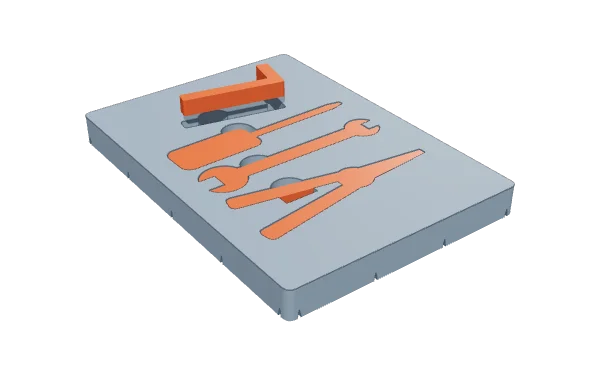
Shadow Board
Every tool’s home position is clear at a glance, from its shape.
Pick a template. Your design is done.
Igniform has two design modes: Template Mode, for quickly creating the fixtures used most often on the shop floor, and Free Design Mode, for building fixtures from scratch by combining basic shapes.
Template Mode
Includes templates for 11 standard shop-floor fixtures, such as shadow boards and positioning plates. Just pick one and enter the dimensions — the design is done in minutes, with no CAD knowledge needed. More templates are planned, and templates can also be customized to your needs.
Free Design Mode
Combine basic shapes such as boxes and cylinders and cut them with Boolean operations to design fixtures from scratch, including shapes no template covers. You can also start from a fixture made with a template and refine the details.
* There are currently 11 templates, with more planned. We also offer template customization to fit your needs.
How to use each template, on video.
For each of the 11 templates, a video of about one minute shows which problem it solves and how to build it. Click a card to play it right here (with audio).
Japanese audio, no subtitles
* Parts and equipment in the images and videos are for illustration only (the fixtures are shown in their actual shape).
Is your shop floor still
waiting for the fixtures it needs?
Every day, the shop floor needs small fixtures and work aids.
But no one there can design them, and asking the design department takes time. Igniform eliminates that waiting time.
Design requests take too long
Once a request goes to the design department, drawings and approvals alone take days or weeks — far slower than the shop floor moves.
CAD work depends on a few people
Only a few people can use CAD, so every request lands on them. When they are away, the shop floor stalls.
Off-the-shelf fixtures don’t fit
Commercial fixtures rarely match the small, specific needs of your line, yet custom design isn’t worth the cost.
A 3D printer, but no one to use it
The printer is installed, but no one can create the data. The equipment sits idle.
Igniform solves it.
Shop-floor workers design fixtures and 3D print them on the spot.
No need to go through the design department — ideas become real tools right away.
Why Igniform?
Not a CAD replacement, and not a general-purpose design tool.
Igniform is software dedicated to fixtures, designed for Japanese manufacturing floors.
Shop-floor workers
can use it themselves.
Go from design to output with no CAD learning curve. In Template Mode, even first-time users can create a fixture in minutes. Add design capability to the shop floor without raising skill requirements.
Secure,
on-premises operation.
A desktop app that runs entirely locally and never sends data to the cloud. Even sites that handle confidential design data or sensitive information can use it with confidence once it has passed their security review.
Designed around
Japanese shop floors.
Templates focus on the fixture types most used on Japanese shop floors, such as shadow boards and positioning plates. Use them as-is for 5S activities and visual management.
Igniform’s fixture design engine is proprietary technology developed by FabriAI and registered with the Japan Patent Office (Japanese Patent No. 7898789, registered July 24, 2026).
Simple to use.
Pick a template and enter the dimensions. Check the preview and export an STL.
Then just 3D print it. In tens of minutes, your shop-floor fixture takes shape.
Choose a template
Pick the fixture type you need from the template list.
Enter dimensions
Just type in the workpiece size and fixture dimensions.
Check the 3D preview
Review it in the real-time 3D preview and adjust if needed.
Export STL
Export an STL in one click and hand it to your slicer.
3D print
Print it on your in-house 3D printer and put it to use on the shop floor right away.
- α–V1.2
- V1.3
- V1.4
- V1.5Latest
- V2.0Design with AI
Let’s start
with a conversation.
Evaluating Igniform, looking for a PoC, or want to talk through challenges on your shop floor?
Feel free to get in touch.
In Japan, Igniform purchases and demos are handled by our sales partner Japan 3D Printer (日本3Dプリンター株式会社). For product specifications or questions about introducing Igniform, feel free to contact FabriAI.